
GenMeta vs Rushlot for stock footage metadata
GenMeta is a Windows app that writes metadata and stops at a CSV or the file. Rushlot is a Mac and Windows app for stock footage sellers that drafts the metadata and uploads the clips too. Here is what each one does, from its own pages, with the date we read them.

At a glance
 Rushlot | GenMeta | |
|---|---|---|
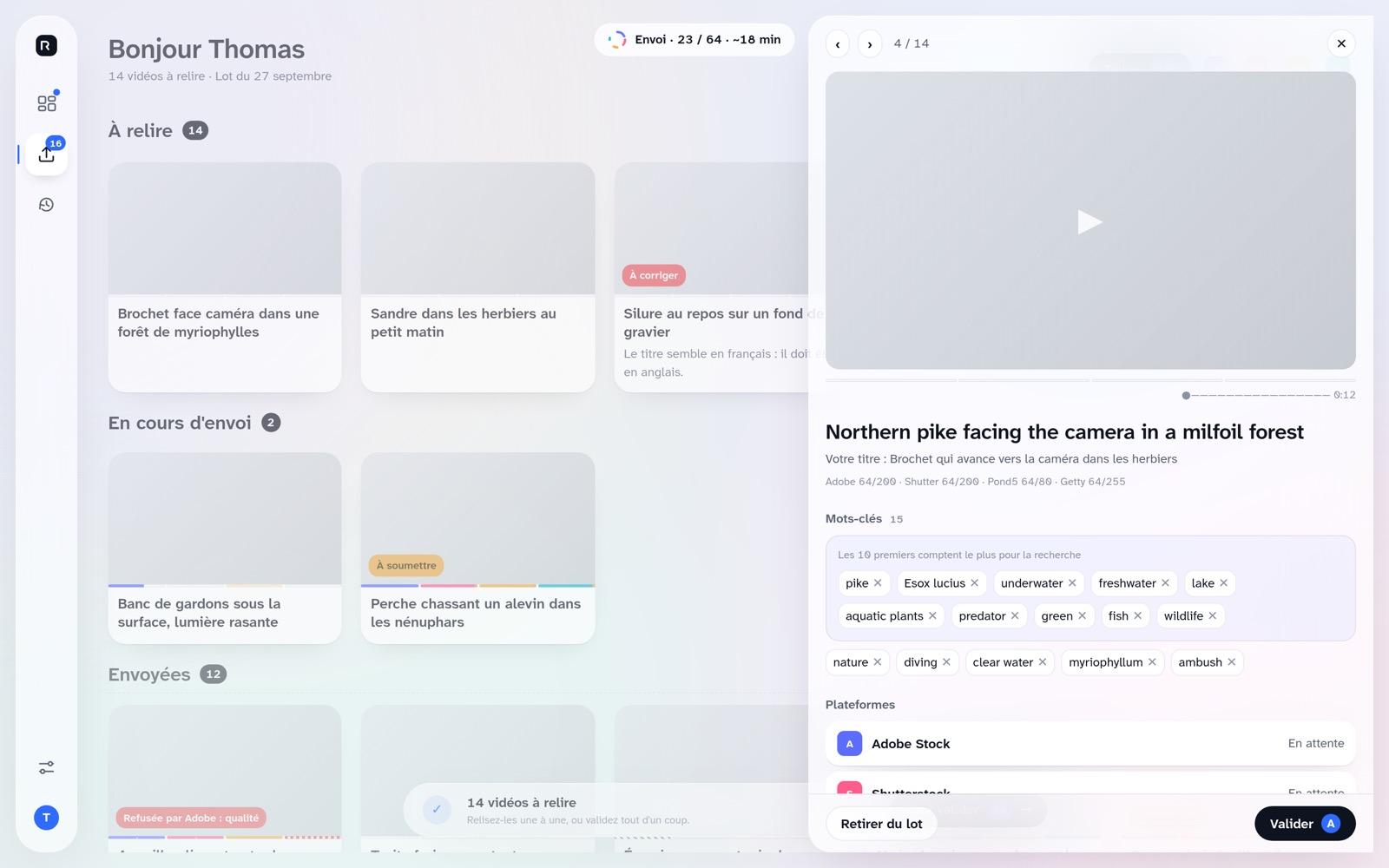
| What it is | For stock footage: one review, four marketplaces. Each clip is checked, its metadata drafted for each marketplace, and nothing is ever uploaded twice. | A desktop app for microstock contributors that uses Google’s Gemini AI to write relevance-ranked titles, descriptions and keywords. [1][5] |
| Marketplaces from one review | Adobe Stock, Shutterstock, Pond5 and Getty Images from one review, to your own accounts: SFTP for Adobe Stock (qualified accounts), FTPS for Shutterstock and Pond5, Getty’s own uploader in your browser. | None. It gives you CSV files for Adobe Stock, Shutterstock and Getty/iStock, among others, and its video page names Pond5 too. The pages we read describe no upload to an agency. [1][3] |
| A metadata set per marketplace | Titles, descriptions and keywords for each marketplace, drafted from your own title. You review them once, before anything leaves. | It exports a CSV in each marketplace’s format. The pages we read do not say the titles and keywords differ from one marketplace to another. [1][3] |
| Spec check and repair | Checked against each marketplace’s specs: frame rate, resolution, duration, codec. Any repair, like removing audio or re-encoding HEVC to H.264, is made on a copy. Your original is never touched. | MP4 and MOV. It samples representative frames on your machine and tags camera movement, lighting and subject. The pages we read do not describe spec checks, removing audio or re-encoding HEVC. [3] |
| Never uploaded twice | Never uploaded twice. Rushlot keeps its own record of each clip on each marketplace, and two clips that share a file name are both held back. | The pages we read do not mention a guard against sending the same clip twice. [1][3] |
| Uploads for you | Uploads the files itself, to your own accounts. Nothing to export and carry over by hand. | You do the upload. Its steps end with “Review and export”, and the pages we read describe no upload to an agency. [1] |
| No AI key to manage | No AI key to set up or pay for separately: the drafting is part of every clip, the 20 free ones included. | Its pricing page says one plan “Requires your own Gemini API key”; on paid plans you bring a key or buy credits. [2] |
| Mac and Windows | Mac and Windows: Apple Silicon (M1 or newer) and Windows x64. | Windows 10 and 11, 64-bit, from its download page. Its footer says “Built for Windows”. [4][1] |
| Metadata in the file | Title and keywords written into the video file as XMP, which Adobe Stock and Pond5 read. For Shutterstock and Getty, which do not, Rushlot fills the CSV import too. Measured on a real account, 2026-09-07, 2026-09-08, 2026-09-11 | It embeds EXIF, IPTC and XMP into “supported files”, or exports a CSV. The pages we read do not say whether video files are among the supported ones. [1][3] |
- Rushlot does it
- Its page says it does not
- Its pages do not say
Where Rushlot differs
- Adobe Stock, Shutterstock, Pond5 and Getty Images from one review, to your own accounts: SFTP for Adobe Stock (qualified accounts), FTPS for Shutterstock and Pond5, Getty’s own uploader in your browser.
- Checked against each marketplace’s specs: frame rate, resolution, duration, codec. Any repair, like removing audio or re-encoding HEVC to H.264, is made on a copy. Your original is never touched.
Which to choose
Choose Rushlot if you work on a Mac or a Windows PC, sell stock footage, and want the step GenMeta leaves to you, the upload to each marketplace, done from the app.
How we checked
We make Rushlot, so we are not neutral. Every fact here about another company was read on that company’s own public pages on , without signing in, creating an account or starting a trial, and each one links to its source. Facts about Rushlot come from its own product rules and this site; a cell marked Measured was read on a real contributor account. Prices and features change, so check their pages before you decide. No logos, no ratings, no ranking.
GenMeta and every other product named here are trademarks of their owners. Rushlot is not affiliated with any of them. Found an error? Tell us at contact@rushlot.com.
Frequently asked questions
The pages we read on 8 November 2026 describe exporting a CSV or embedding metadata, and describe no upload. Rushlot uploads the clips to your own Adobe Stock, Shutterstock, Pond5 and Getty accounts.
Its download page offers Windows 10 and 11, 64-bit, and its footer says “Built for Windows”. Rushlot runs on Apple Silicon Macs and on Windows.
On one of its plans, yes: its pricing page says it requires your own Gemini API key. On paid plans you can bring a key or buy credits. Rushlot needs no AI key of yours.
It embeds EXIF, IPTC and XMP in “supported files”, and the pages we read do not say whether MP4 or MOV are among them. Rushlot writes XMP into the video file right before upload.
Its FAQ says no: it runs locally, and only lightweight visual data is processed for AI analysis. Rushlot works the same way on that point: it sends a few small frames, not the clip.
For stock footage sellers on Adobe Stock, Shutterstock, Pond5 and Getty Images, from a Mac or a Windows PC, yes: Rushlot checks each clip, drafts its metadata for each marketplace and uploads it.
Sources
More comparisons
- MyKeyworder vs Rushlot for stock video
- ImStocker vs Rushlot for stock video
- Xpiks vs Rushlot for stock video
- Wirestock alternatives for stock footage (2026)
- PhotoKeyworder vs Rushlot for stock video
- AutoKeyWorder vs Rushlot for stock video
- MetaMule vs Rushlot for stock footage
- SendStock AI vs Rushlot for stock footage
- StockSubmitter vs Rushlot for stock video
- MyKeyworder alternatives for stock video (2026)
- ImStocker alternatives for stock video (2026)
- Blackbox alternatives: sell footage from your own accounts
- AGKeywords vs Rushlot for Adobe Stock video
- Microstock+ vs Rushlot for stock video
- StockSubmitter alternatives for stock footage sellers
- ClipMeta vs Rushlot for stock footage metadata
- CyberStock vs Rushlot for stock video
- Exifio vs Rushlot for stock footage
- Software to upload stock footage to several agencies
- Meita.ai vs Rushlot for stock video metadata
- TagMyClip vs Rushlot for stock footage
- AI Stock Keywords vs Rushlot for stock video
- Stocktag vs Rushlot for stock video metadata
- QuantumFolio vs Rushlot for stock submissions
- Xpiks alternatives with AI metadata included
- Microstock+ alternatives that keep your logins with you
- All comparisons, latest checked on 2026-11-14